
Patient Portal
Modernize and elevate a legacy patient portal messaging experience.
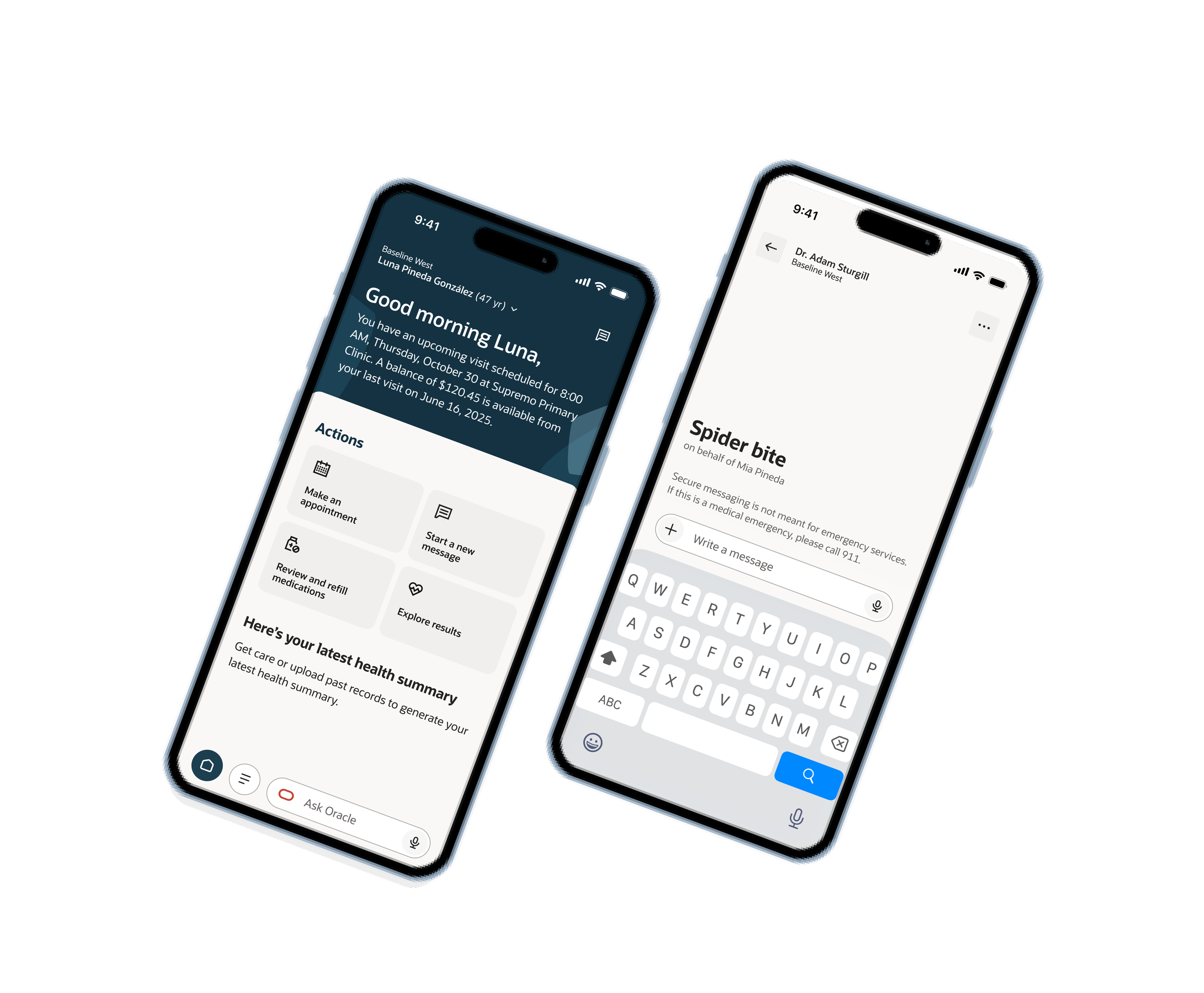
Duration
Two years, two months
Role
UX Designer
Tool
Figma, Figma Make
Industry
Healthcare
01
Overview
Health care has a notorious history of having outdated and suboptimal user experiences. In a world where people are being pushed to focus on wellness and health, doesn’t it make sense to provide users with the best? Best experience, best response times, and best practices in design to optimize their health?
One of the cool facts I learned was messaging is the #2 reason people use a patient portal. With that tidbit, it made sense to update the messaging experience so users can quickly communicate with providers, loop in caretakers or proxies into ongoing conversations, and even tap into AI for assistance.
Scope: Elevate the legacy messaging experience, shifting from a web-browser experience to responsive and ultimately a native mobile-first experience.
02
Design
Process
Over the past 2 years, I collaborated with our Research team to comb through a plethora of research materials and user testing data. I learned and understood what our users were expecting from their experience. The research validated some notions we already had:
The legacy messaging experience was outdated - Cerner had entered a maintenance mode where they had not updated designs in years - providing a clunky and cluttered UI.
Hard to navigate - With obscure terms and no descriptions to assist users in their selection, our research found users did not know how to reach the correct team for answers.
Slow response times - Cerner had all message types routed to the provider’s inbox, even if it was for billing or admin, which bloated the inbox - resulting in delayed response times.
As a cross-functional team, Research x Design x Product met multiple times a week to create personas, user goals and scenarios focused on pushing the limit of the existing design.
The main goal was to create an intuitive workflow with reduced number of clicks, clear directions, and modernized components.
There were several iterations that focused on different goals, which I have shared below with annotations.
Iteration 1
→
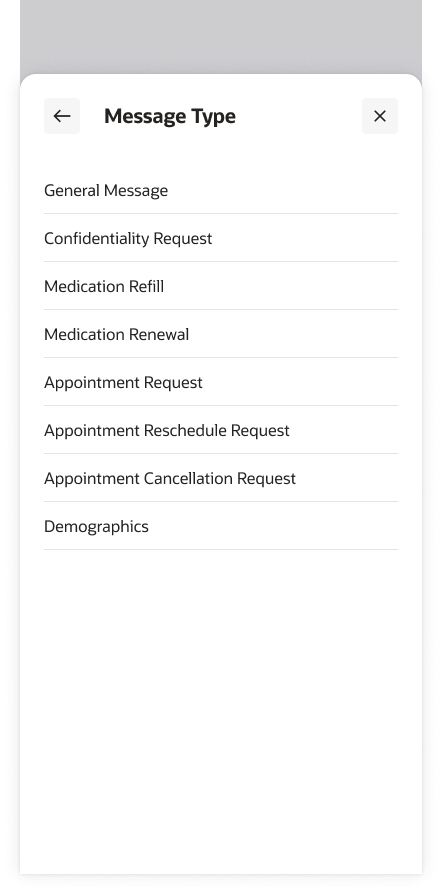
Simplify and clarify what type of message the user should select.
Usability tests told us having a list of message types was confusing for the general public - leading to users to inundate their provider’s inboxes with many messages!
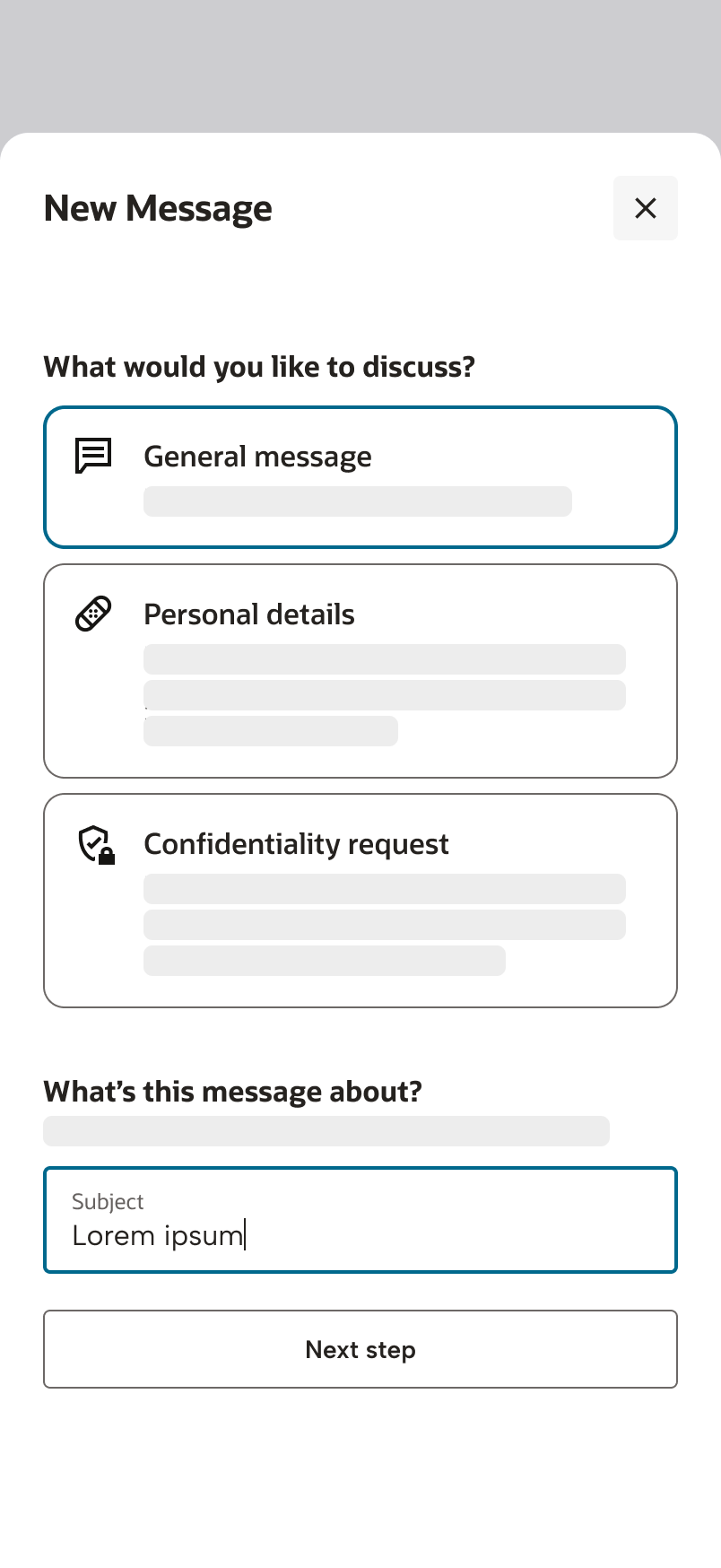
This told me users do not understand what these generic message types mean - for example, what does confidentiality request really mean?Guided workflow
In this iteration, the team explored the idea of creating a guided workflow to include more descriptions of what each option means, and also aligned with the general model we created in other parts of the portal. I worked with our technical writer to ensure we aligned with Oracle’s standards and providing detailed descriptions.
Exploration 2
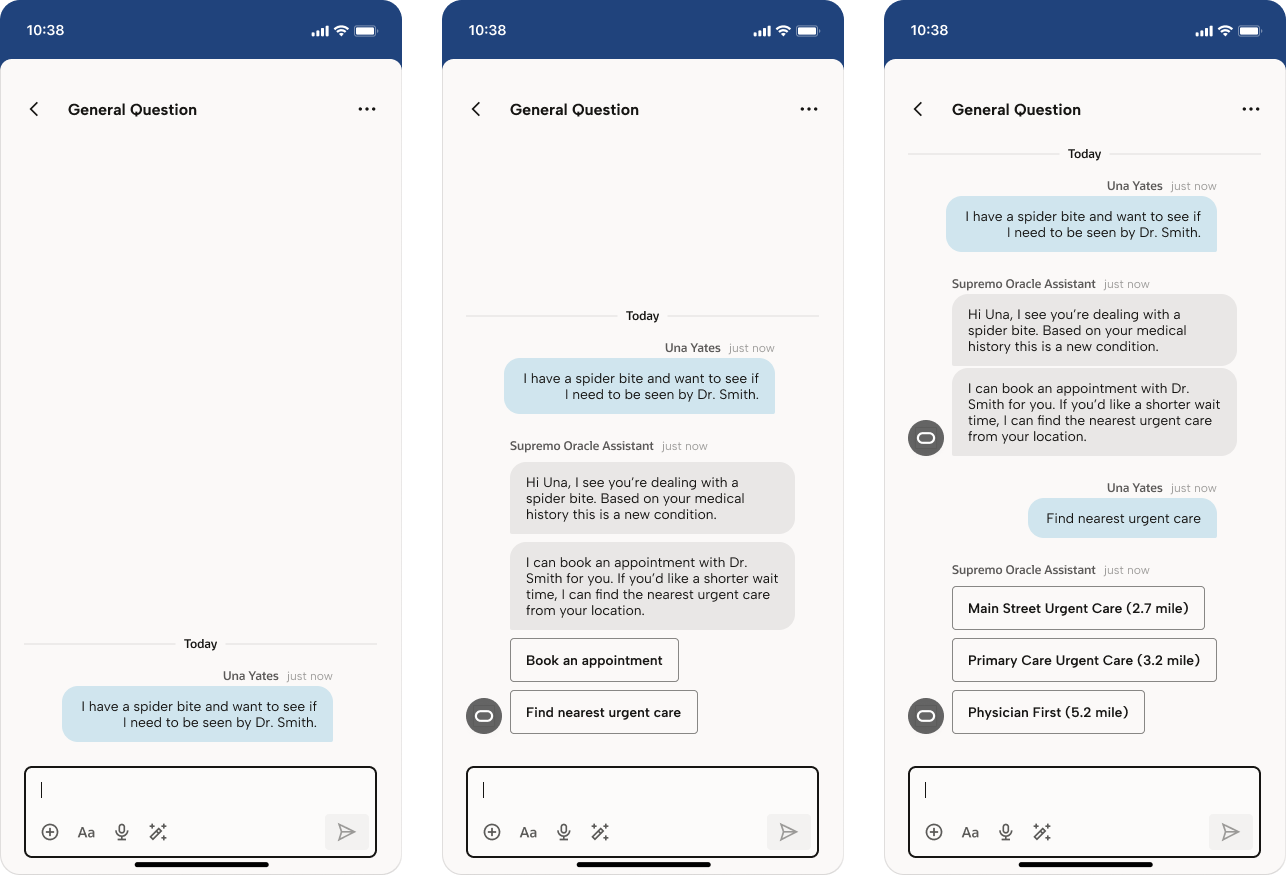
In this version, the user initiates the chat with their question or concern. Oracle Assistant asks follow up questions to clarify, but analyzes the situation in the background, and recommends other options to address the concern.
In this example instead of sending a message to Una’s primary care provider about a spider bite, Oracle Assistant recommends booking an appointment or finding the nearest urgent care location.
Challenges
Legacy platform
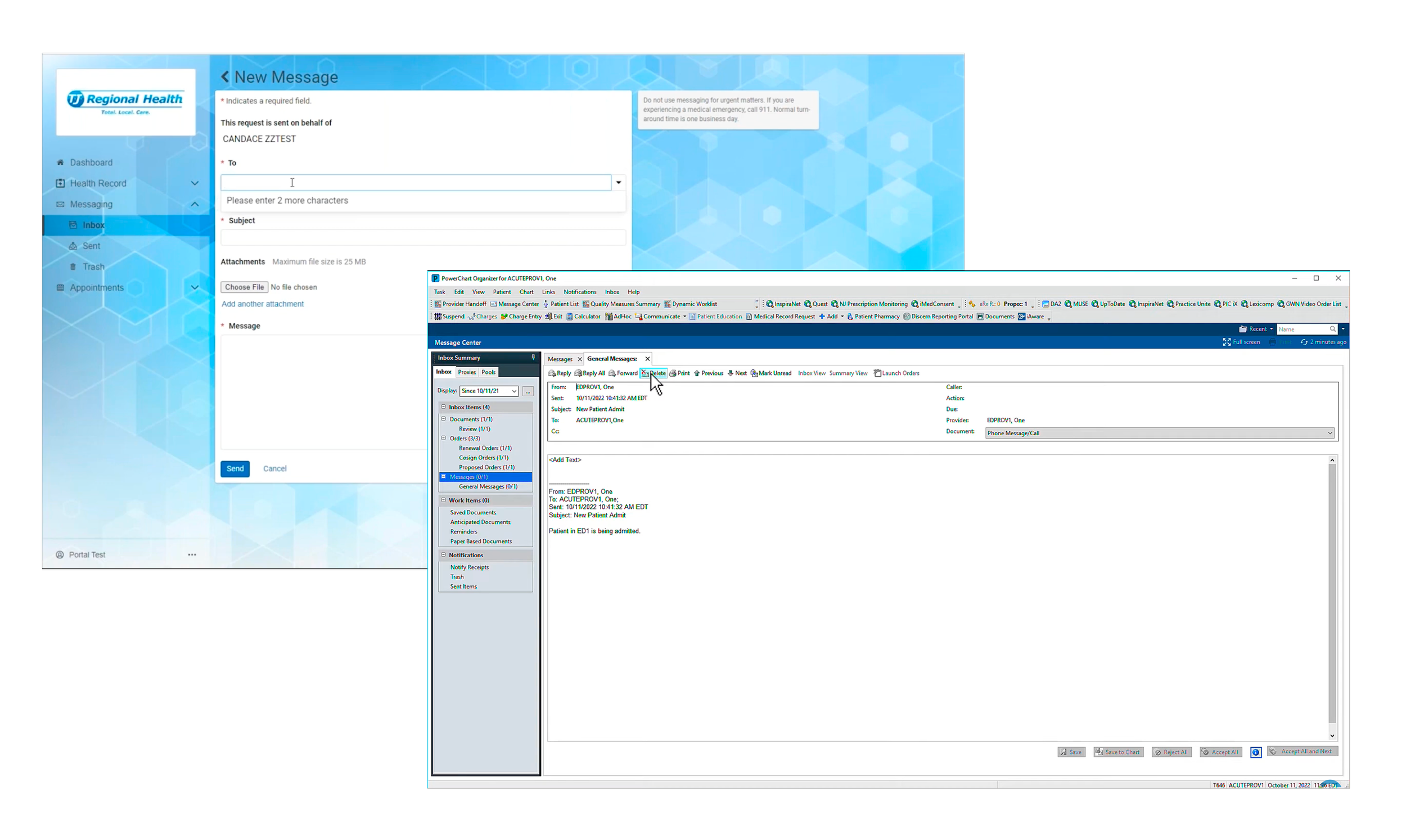
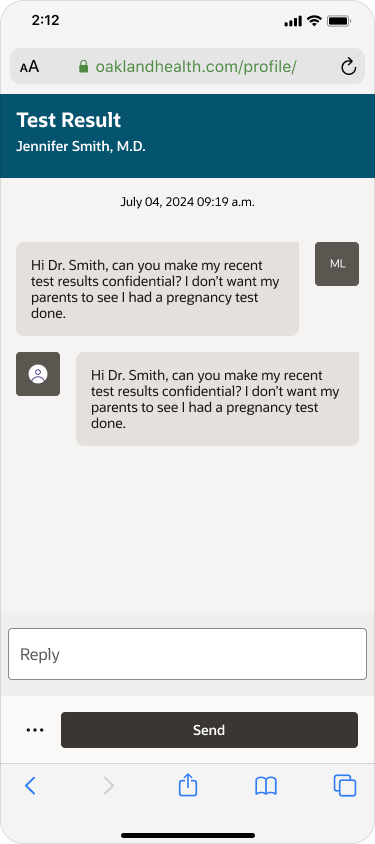
As you can see in the screenshot to the left, the platform was originally designed as a desktop-first product. In order to keep up with competitors and the target audience’s current needs, the company identified and understood the importance of designing mobile first.Single message responses
The legacy platform only allowed for single message responses; meaning each sent and received message was logged as separate list items. In order to see the full message history, the user would have to actively switch from their “inbox” folder to their “sent” one. This causes a huge burden on the user in order to maintain their health history. Additionally each list item creates a lot of bloat in the user’s inbox.
Goal
Our goal with the first iteration was to:
Align with Oracle Design standards (Redwood), which makes our designs scalable, accessible and easy to update.
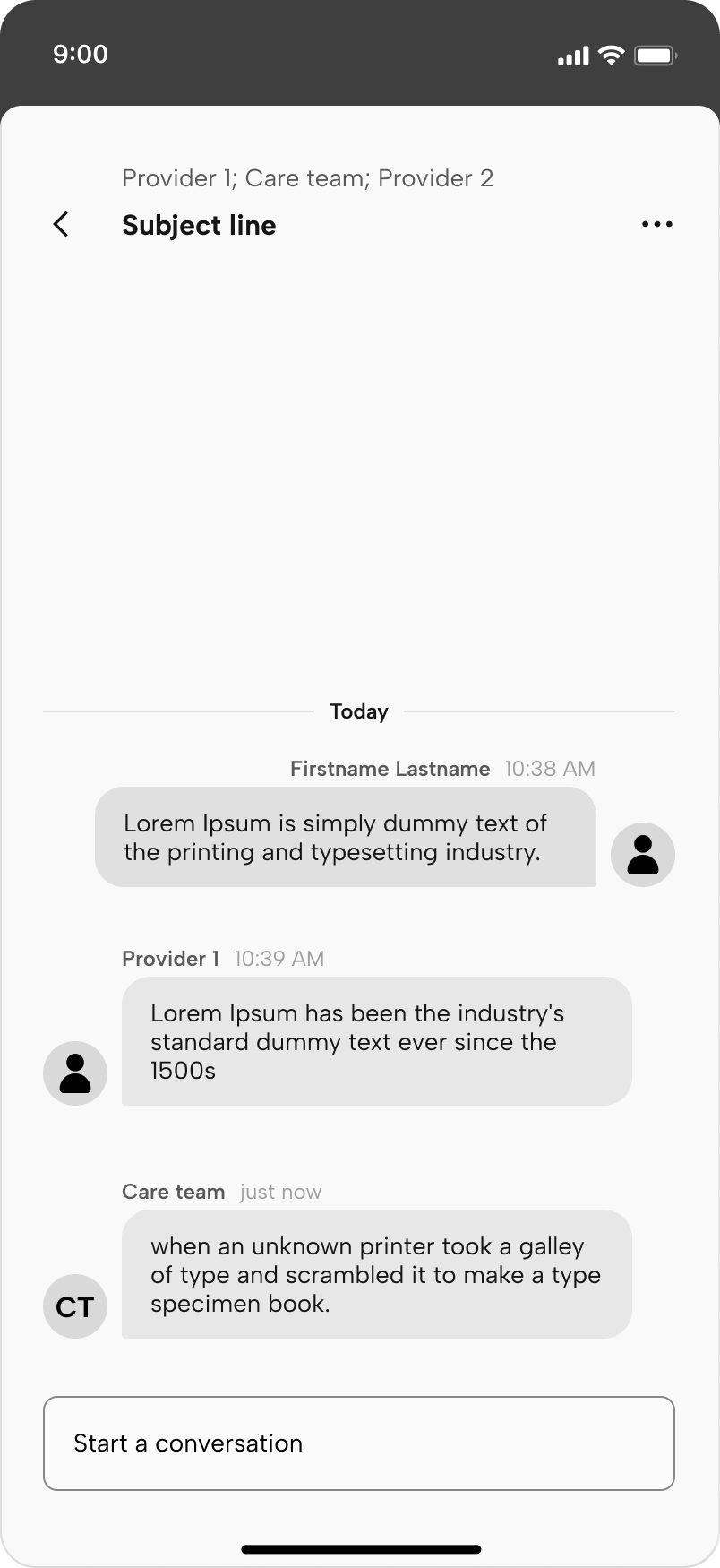
Move away from the plain text, email format towards a chat bubble-style message thread.
I pushed hard on threaded messaging because:
It provides the modernized look and feel users expect
Gives the user context and groups all related messages of a single subject
Alleviates provider’s inbox bloat since each message is no longer a single item in the inbox
Iteration 2+3
Since the mobile-first approach was a 0 → 1 project, there were many ideas and priorities that were pushed to the team. This made it even more important for Design to collaborate with Product, to create roadmaps together, prioritize scenarios, find all (even obscure) use cases, and create feasible deadlines we can track.
Goal
For this iteration we prioritized:
Supporting different types of messages
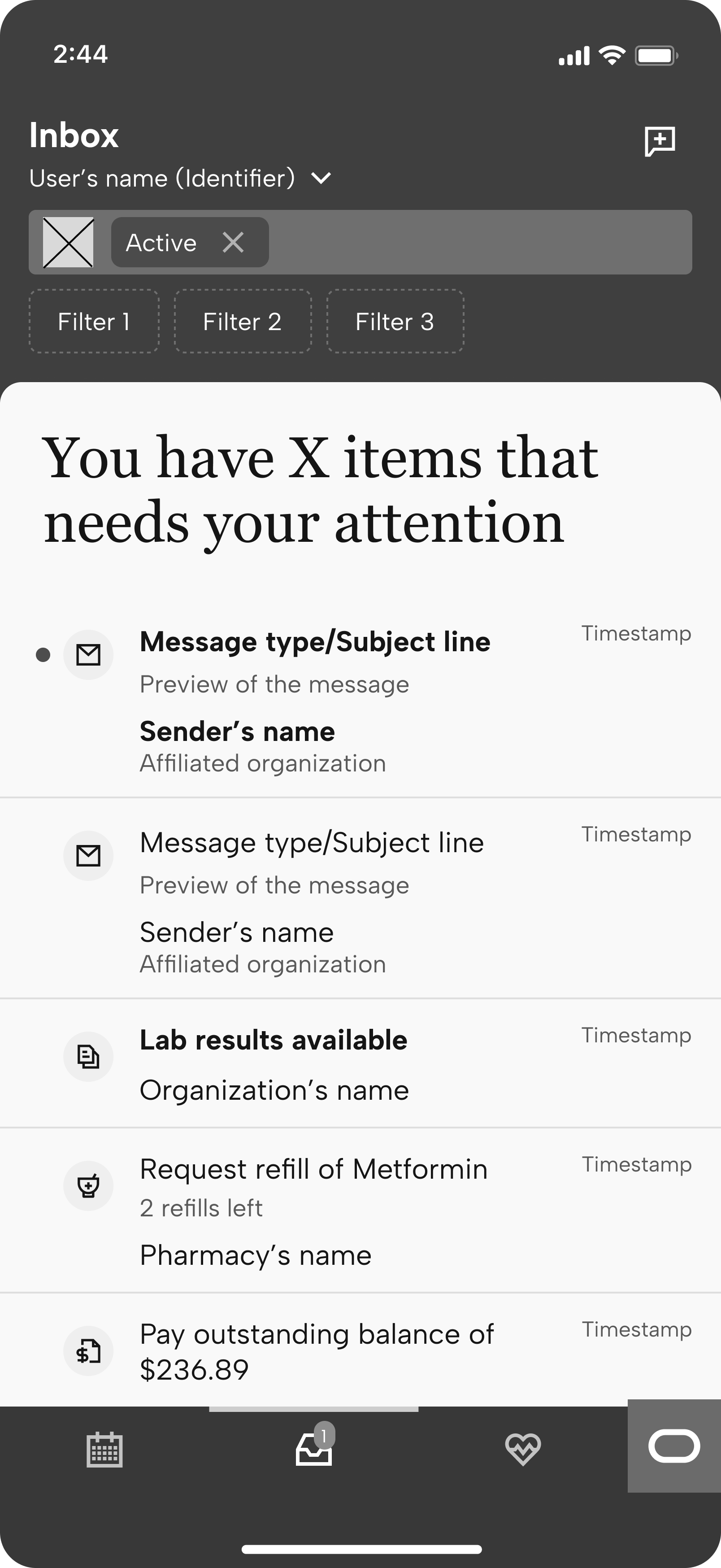
The team saw the opportunity to support other items in the inbox, not just messages. The first thought was supporting medication renewals. Our research showed users typically message their provider for medication renewals, since this usually requires an appointment to be filled.
Yes this flow could be initiated from the medication list page, but bringing this item to the inbox reduces cognitive load and burden to remember which medication our users need to renew.Design for iOS native app
At this point, there was a pivot in organizational priorities, and we were pushed to start designing an iOS mobile app version of our patient portal.
As a 0 → 1 product, I was responsible for meeting with leadership and product to create our first MVP version. This was challenging as it was the first time we had to consider mobile frames, create new components, and consider the number of clicks a limited screen size demands.Push notification support
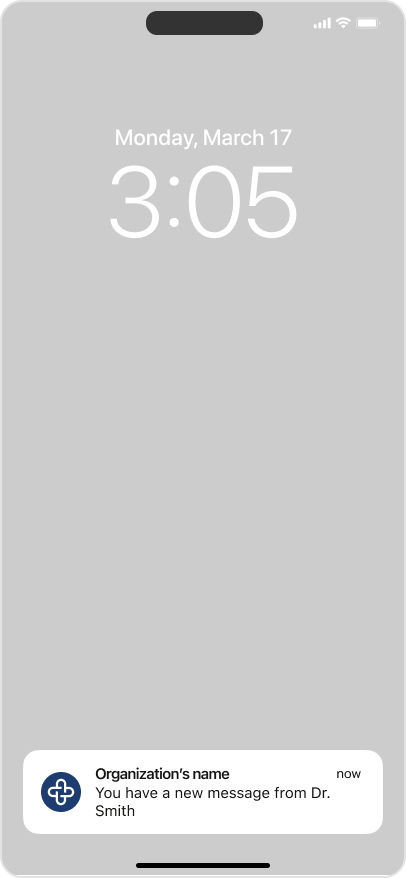
Push notifications are a must for native apps! I worked with Engineering to place this priority on their roadmap and worked with them to map notification type → the correct landing page.
This was also an important step as our research showed our users not only expected deep linking, but also reduced clicks.Link specific message threads
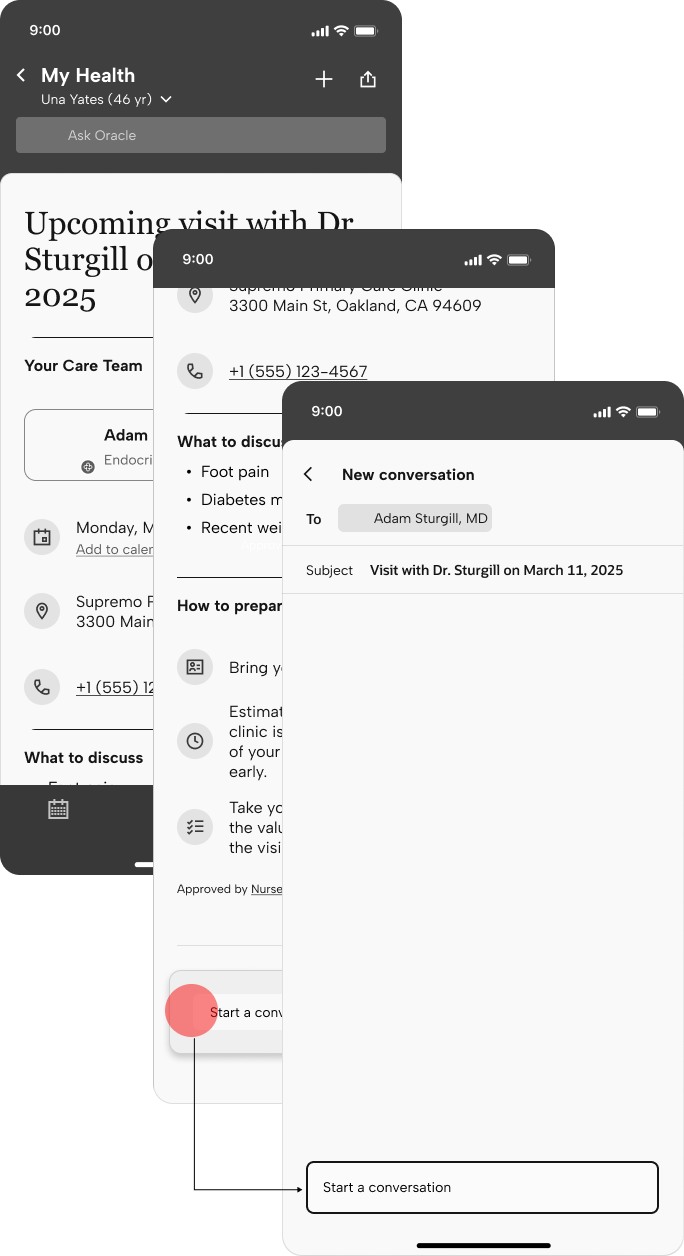
My team lead and I explored linking specific message threads to related pages.
What does this mean? Opening a message thread about a test result should lead you to the message thread opened with the test result page loaded in the background. Shouldn’t you also be able to start a conversation about a specific test results from the result page? This felt like a no-brainer, giving users the context they need, especially when you’re coming back for more information days or weeks after the fact.
Unfortunately we could not agree upon the mental model when presenting the idea to leadership, so it was scraped for the time being. Ideally, with this model in place no matter where the user creates a new message, it would follow you as you navigate across the portal.
Iteration 4
With the third iteration, the team gathered analytics and identified pain points to address:
Goals
Provide quick links to create a new message
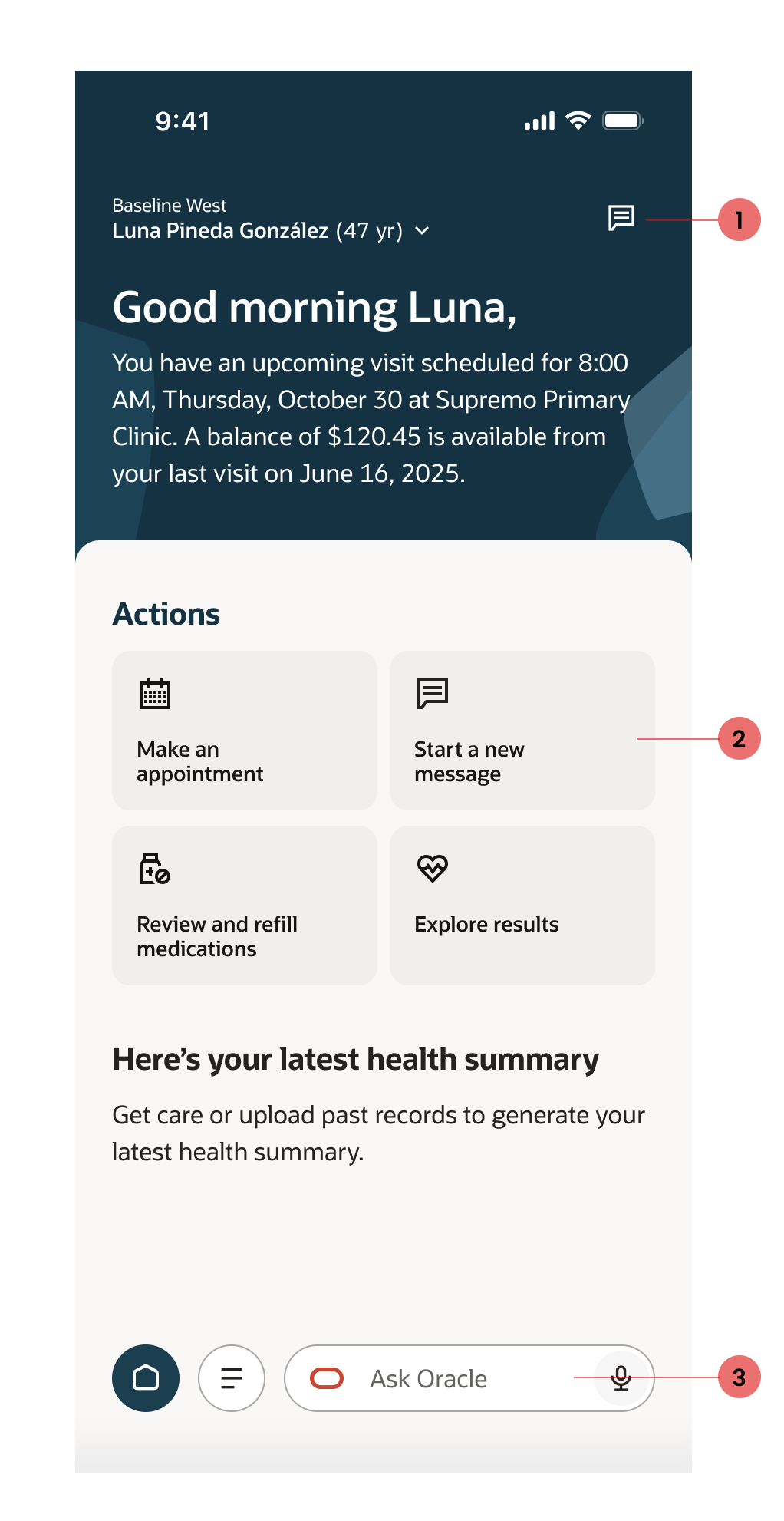
This one was easy to solve - with the guidance of our research team, the team decided we need to have multiple entry points into messaging.
Sticky header with a “New message” button, accessible on all pages of the portal.
Quick action card on the homepage, leaning into the fact that research informed us sending a message is the #2 reason users use their patient portal.
Ask Oracle assistant to create a new message, redirecting the user to the workflow.
→
Iteration 5
03
Reflection
The last iteration I worked on expanded on the previous iteration to integrate AI into the messaging model.
Goal
Incorporating AI
When it comes to AI and digital assistance, our research team showed us there is still distrust in AI to effectively and efficiently answer our questions; rather users thought AI (namely chatbots) slows down the process.
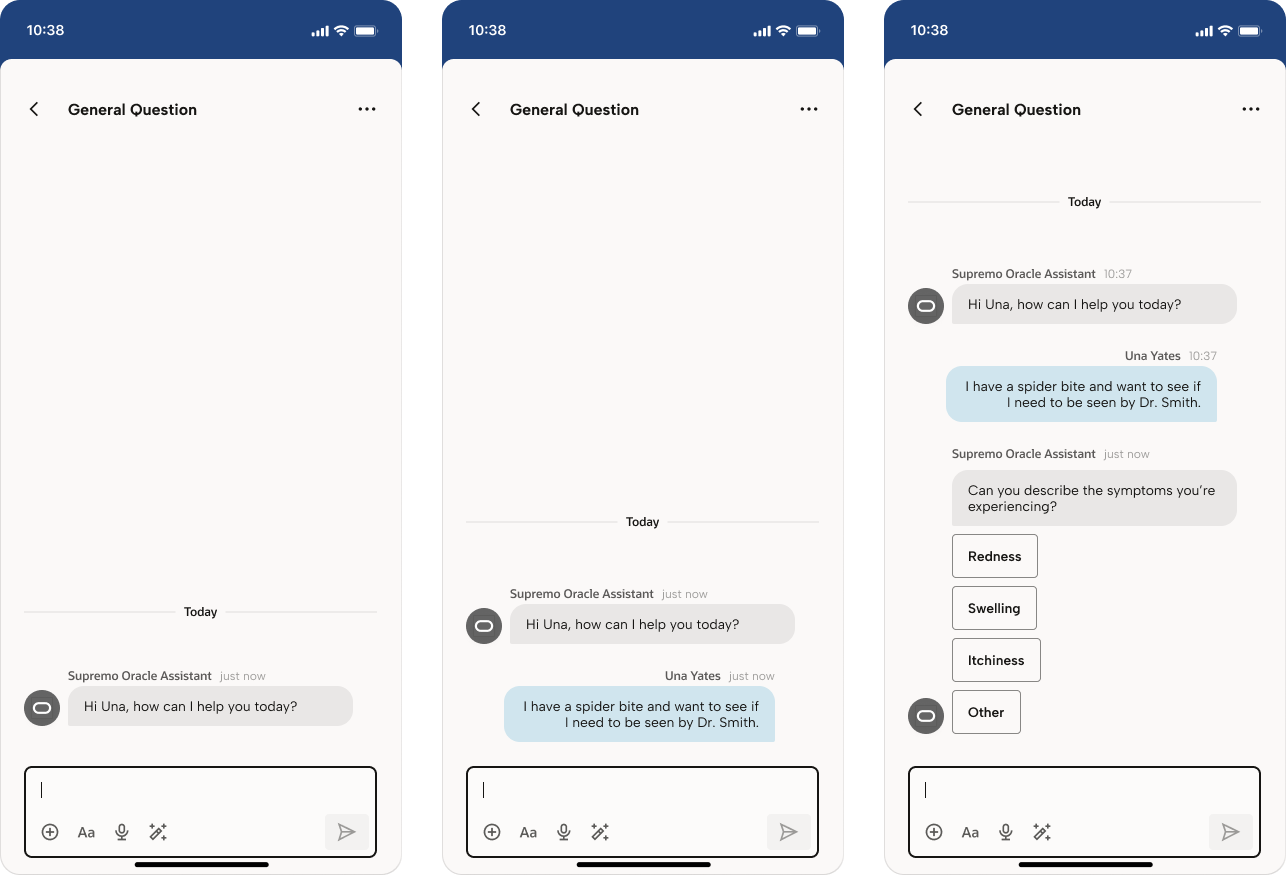
I worked with the research team to create a clickable prototype to find the correct direction we need to take in incorporating AI into our workflows. We tested two models to determine which approach the patient portal should take.
Exploration 1
We presented our usability testers a model where Oracle Assistant acted as a chatbot model - initiating the chat and ask follow up questions turn-by-turn before routing the message to the correct recipient.
What we learned from this test was:
Confirmation of user bias towards chatbots
Users did not like the assistant initiating the conversation, and immediately assumed they would never speak to a real person. They also thought the turn-by-turn questions took too long to get through and wished they could skip them all together.AI should make recommendations
Users found the assistant most useful when it took initiative and suggested different actions they could take. When users could send the initial message they felt in control of the situation and could direct the conversation.
The key innovation we uncovered was giving the users the opportunity to find urgent care, as that would be the quickest solution to their concern. Of course, urgent care is not always the solution so this required deeper exploration and a matrix of answers in the backend to surface these solutions.
Due to our NDA, I’m unable to share the designs we worked on. However the general concept was to alleviate the user from having to make too many decisions. Why should the user be burden with selecting a message type or the recipient, when all they really want is to quickly get in touch with their provider and get answers. What if we used AI to gather those pieces of information, craft a message and even determine who is the correct recipient.
We explored this option and even looked for ways to introduce educational materials early in the user’s message thread. The purpose of doing this was to hopefully answer the user’s question and reduce the number of messages the provider receives.
Reflection
It was truly a shame I couldn’t work more on this project, but I’m so thankful for the opportunity I had to work with our AI team in the end! It was such a fun project and have so many more ideas I wish I could have shared with the team.
Iteration 6